IDX Pages and the Dynamic Wrapper on Any Website
Wrapper setup for any website builder, with links to the WordPress and Webflow walkthroughs when you need exact clicks.
Written by IDX Plugin, an independent IDX Broker Developer Partner, not affiliated with IDX Broker.
On this page
In short
- Your IDX pages open inside your own header and footer.
- Results, listing pages and forms all sit in that frame.
- Our templates set the layout inside the frame.
- Your builder needs an element that renders HTML code.
What the IDX pages are
Beyond the widgets from Add IDX to Any Website with HTML, your IDX Broker account generates a whole set of pages from your MLS access: the search results, single property pages, contact and valuation forms, saved searches and accounts. They are hosted by IDX Broker and kept up to date from your IDX Broker feed. A wrapper page is what puts your header and footer around them.
How the wrapper works
The wrapper is a regular page on your own website that contains your header, your footer, and two small tags between them. IDX Broker reads that page and injects its content exactly where the tags sit, so every IDX page inherits your layout. The tags look like this:
<div id="idxStart"></div><div id="idxStop"></div>-
1
Create the wrapper page
On your website, create a page named something like IDX Wrapper. Use a layout that shows your header and footer with an empty content area between them.
-
2
Paste the two tags
In the empty content area, add your platform's HTML element and paste the two tags shown above. They mark the beginning and end of where IDX Broker inserts its content.
-
3
Publish and copy the URL
Publish the page and copy its full URL, for example https://your-site.com/idx-wrapper.
-
4
Set the Dynamic URL in IDX Broker
Log in to IDX Broker, go to Design then Website then Wrappers, open the Global tab, paste the URL into the Dynamic URL field and click Save Changes. IDX Broker keeps a cached copy of the wrapper page, and it can be refreshed on the same screen where the Dynamic URL is set.
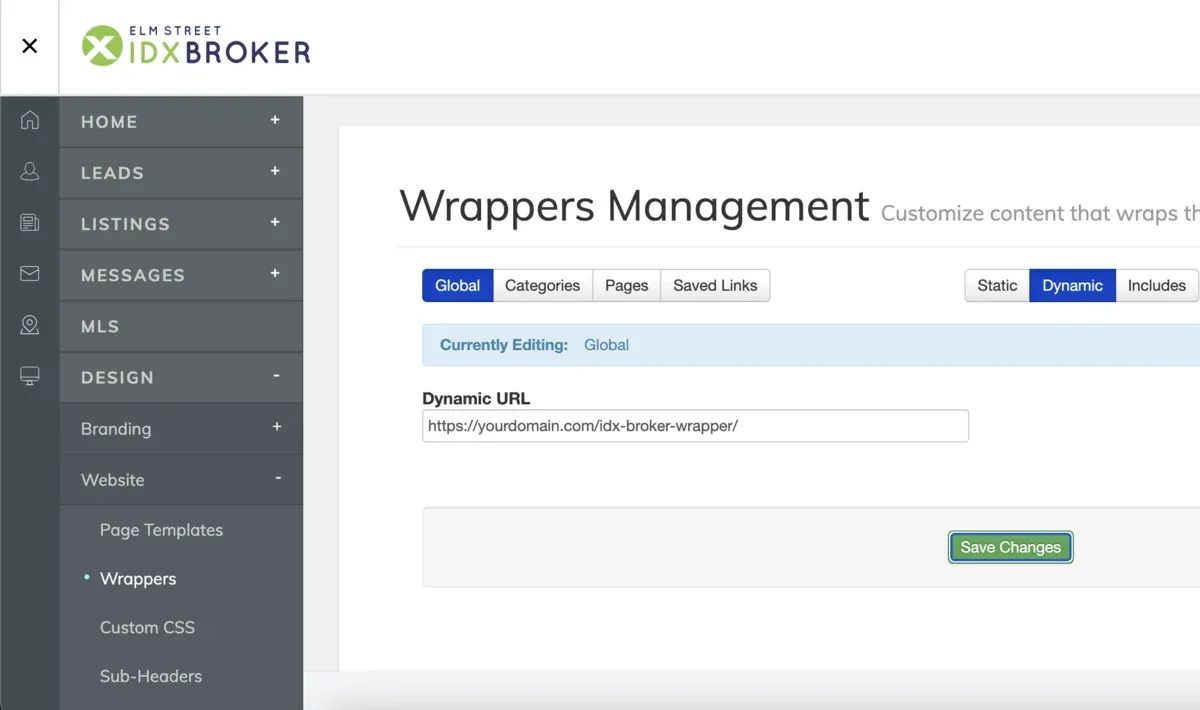
The platform-specific walkthroughs
The exact clicks depend on your builder. For WordPress, the Elementor and Gutenberg guides show the wrapper step with screenshots, and Webflow has its own walkthrough. On platforms where embeds run inside iframes, like Wix, the wrapper is set up individually, so write to us through idxplugin.com/contact and we handle it with you.
Next, put your own layout on the IDX pages
The wrapper solved the frame. For the layout between your header and footer, we publish our own templates into your IDX Broker account and you select them page by page, a few minutes and no code, as covered in How Our IDX Broker Templates Work. Global Styles then matches everything to your brand. You can see the results page running live on our demo.
Want us to set the wrapper up with you?
Create a free IDX Plugin account and write to us. Most of the work happens on our side, in the dashboard and on the IDX Broker pages, and for the part on your website we arrange it in whatever way suits you.
Get Started, it's free No extra invoice. You only pay IDX Broker.