Listing Widgets, Which One to Use
For putting live listings on your pages: what each widget does best, what the cards can do, and where to use them.
Written by IDX Plugin, an independent IDX Broker Developer Partner, not affiliated with IDX Broker.
On this page
In short
- Live listings on any page of your site: grid or carousel.
- Each page shows exactly the listings that belong there.
- Cards carry your brand, set once in Global Styles.
- Listings come live from your IDX Broker account.
The two widgets
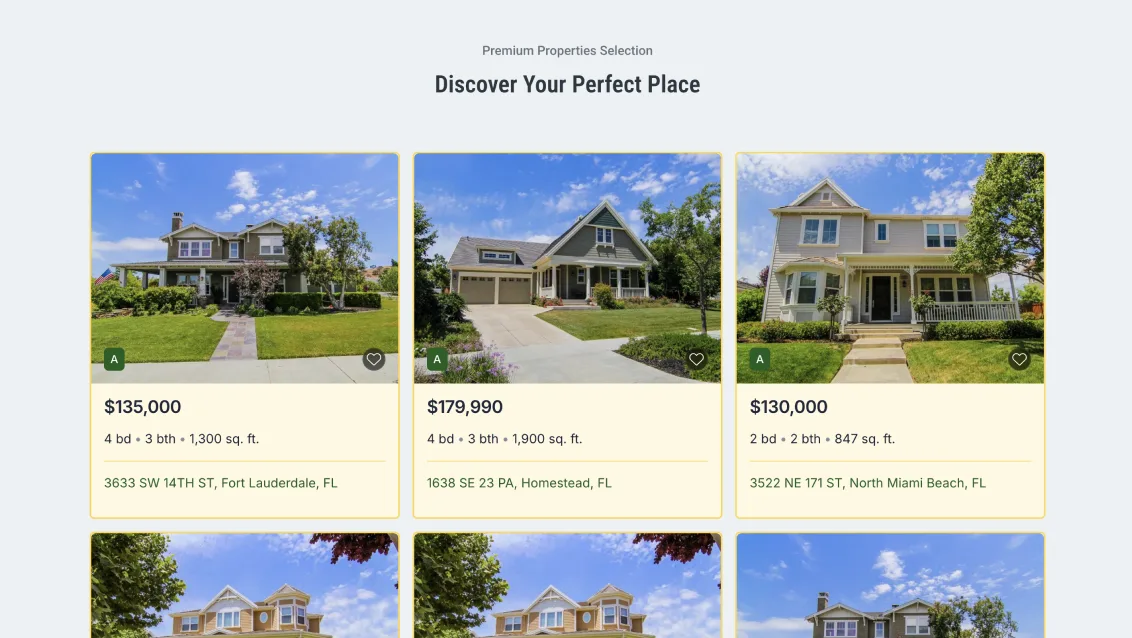
The Listing Showcase is a grid of listings in a clean card layout, built for clarity and trust. Use it to fill a homepage section or a whole page with real properties.
The Listing Carousel shows the same cards in one horizontal row with arrows. A good fit when you want listings on the page without taking much vertical space.
Both examples above are running live, with real listings and working cards. On your site they show your own listings instead.
| Widget | Best for |
|---|---|
| Listing Showcase | Homepage sections, community pages, pages where listings are the content |
| Listing Carousel | Tight sections, pages mixing listings with other content |
Built on IDX Broker widgets
These are IDX Broker widgets that we create on your account, and the ones we create carry our design layer: our cards, a consistent look, and styling that follows your Global Styles. Listings come live from your IDX Broker account, so there is nothing to import or refresh by hand.
What the cards can do
- A clean card design with clear text hierarchy, built for readability.
- When a visitor clicks the favorite icon, a full-screen popup opens.
- Precise control over what shows: filter by status, price, location, beds and baths.
- Layout control: choose which details appear on the card and set the number of columns.
Where to use them
A listing widget can go on any page of your website: the homepage, landing pages, community and neighborhood pages, blog posts, an agent's own page, a page for a single price bracket. Write about an area and let the cards show what is for sale there. Each widget carries its own filters, so every page can show exactly the right listings.
Setup and styling
Each widget has its own short setup guide: Listing Showcase, Setup and Options and Listing Carousel, Setup and Options. The embed mechanic itself, one code into your platform's HTML element, is covered in Find and Paste Your IDX Embed Codes. Cards read your Global Styles first, and any single widget can still be fine-tuned on its own with a live preview.
Already on IDX Broker? Try the cards on your own listings.
Create a free IDX Plugin account, add your IDX Broker API key, and the styled Showcase and Carousel widgets are ready in your dashboard, filled with your own listings.
See it on your own listings No extra invoice. You only pay IDX Broker.