Search Forms, Every Layout Explained
Pick the right form for your homepage, sidebar or landing page, with each layout shown live so you can try it.
Written by IDX Plugin, an independent IDX Broker Developer Partner, not affiliated with IDX Broker.
On this page
In short
- Five layouts, so search fits a hero, sidebar or landing page.
- A visitor who mistypes a city still gets results.
- Visitors search by address, city, county or postal code.
- Every form comes out in your brand colors and fonts.
The Search Form, the one most sites use
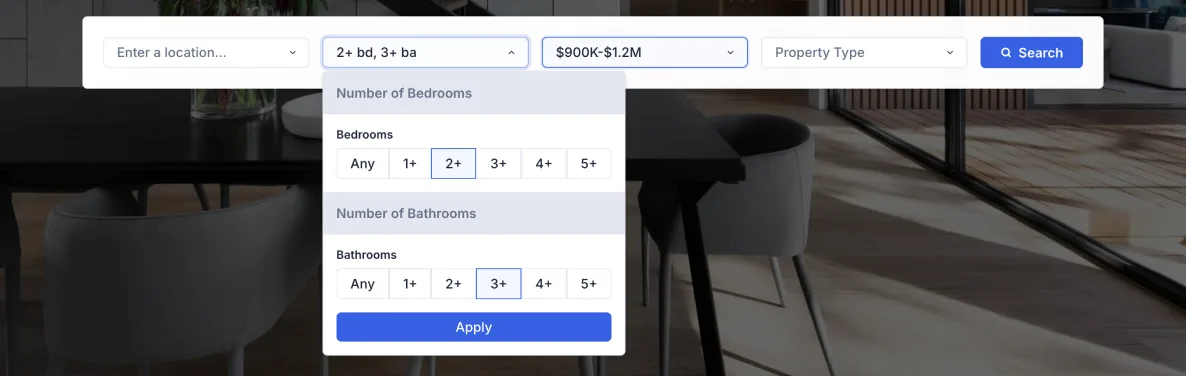
This is our flagship widget and the natural starting point. Location plus the fields buyers expect, price, beds and baths, property type, in a bar that sits across the top of a hero section. Visitors recognize it, because it behaves like the search on the big portals. You can see the search form live on our demo site.
What makes it work
- The location input forgives real people: typos, pasted addresses with commas, word order changes, half-finished queries.
- Autocomplete covers address, city, county and postal code.
- Bedrooms and bathrooms sit in one combined filter with quick-select buttons, the pattern people already know.
- The price range takes dropdowns or typed input, with smart placeholders like $800K to $1.1M.
- You decide which fields appear and in what order, with a live visual preview.
The richer variant, with More
The same form, plus a More dropdown for everything beyond the basics: square footage, lot size, year built, virtual tours, open houses and other MLS fields. The bar stays calm at first glance and opens up for visitors who search in detail.
This one below is not a screenshot. It is the live widget, so type a city or play with the filters.
When you want something smaller
A full bar does not fit everywhere, and sometimes fewer fields simply convert better. Three alternatives run on exactly the same search engine, so nothing is lost in quality.
Simple Search Form, location only
One field. Visitors type an address, zip code, city or county and land straight in the results, where they can refine everything anyway. It fits a hero section, a landing page or a spot next to other content.
The live version is right below. One field, and it still forgives a typo.
Vertical Search Form, for narrow spaces
All the fields of the full form, stacked vertically. Made for a sidebar, a narrow column, or a homepage split into text on one side and search on the other. Nothing is dropped, only rearranged.
This one is live too, at the width it would have in a sidebar.
AI Search Form, for typing in plain words
Visitors write the way they speak, even with typos, like "San Diago 2 bedroom under 500k", and the form turns it into a real search. It works as an extra next to your main form. How it works and where to place it is covered in AI Search Form, How It Works.
Quick reference
| Layout | Best for | Width |
|---|---|---|
| Search Form | Hero sections, top of the page | 100% |
| Search Form with More | Detailed search across the extra MLS fields | 100% |
| Simple Search Form | Landing pages, minimal designs | Flexible |
| Vertical Search Form | Sidebars and narrow columns | Flexible |
| AI Search Form | An extra next to your main search | Flexible |
Adjust the fields and the look
Every form opens in the Live Editor, where you drag and reorder fields, remove what you don't need and fine-tune the look, with colors and fonts coming from your Global Styles. The whole editing side is covered in Adjust Search Form Fields and Appearance.
Where the forms work
The forms work on any platform that lets you add an element rendering this kind of code, and we have a ready guide for each of the popular ones: WordPress, Elementor, Gutenberg, Wix, Squarespace and Webflow. Any other platform is covered by Find and Paste Your IDX Embed Codes.
Common questions
Already on IDX Broker?
Add your IDX Broker API key to a free IDX Plugin account and your search forms are ready to embed in minutes, styled to your brand.
Get the widgets, it's free No extra invoice. You only pay IDX Broker.